GetFerret for Mac

Every file. Every drive. Even the ones in a drawer.

GetFerret catalogs every drive you own and finds any file on it, including the drives that are not plugged in right now.

Download for MacFree 14-day trial, then $49 once. Requires macOS 14 or later.
Unplugging

Unplug a drive, and GetFerret asks where it's going.

The moment a cataloged drive comes out, GetFerret asks where you are putting it. Type the drawer once and it remembers.

Spotlight

Search for it, and your Mac comes up empty.

Spotlight only sees drives that are plugged in. Eject one, and every file on it drops out of search.

⌘Space
The quick-bar

GetFerret still finds it.

Press Option Space anywhere. Files on unplugged drives come back with everything else, marked with the drive to plug in.

⌥Space
The Warren

It even tells you which drawer.

Note where each drive lives when you put it away. Look it up and GetFerret tells you where to find it: Archive, top desk drawer.

Burrowing

Catalog a drive once. Search it forever.

Plug a drive in and GetFerret burrows through it. From then on it stays searchable, plugged in or not.

The Den

Every drive, in one window.

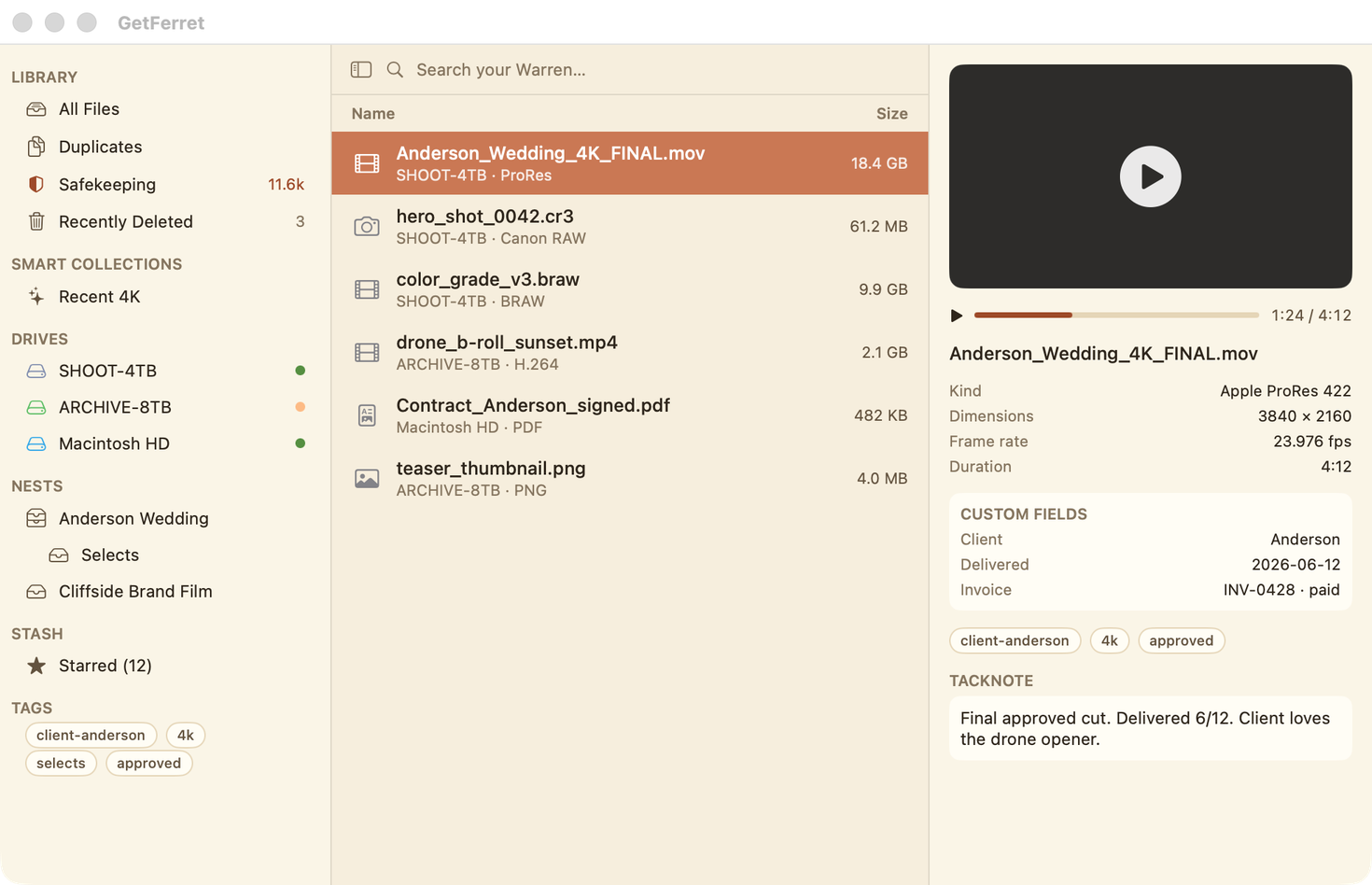
Search, preview and organize every file you own, from the menu-bar ferret. On the left, the sidebar is where the real power lives.

Previews

Previews that actually play.

Video and audio play right in the preview, at their real aspect, with a scrubber. It reads the camera and exposure for photos, and the codec and frame rate for video.

On the file

Your own details, on the file.

Add fields like Client, Delivered or Invoice, tag it, and leave a note. They stay with the file even while its drive is unplugged.

Unplugged

Even the preview knows where it is.

Pick a file on an unplugged drive and the Den keeps its thumbnail and details, and tells you which drawer to open.

Nests

Folders, flipped.

A Nest gathers a project from five drives without moving or copying a thing. When you hand it off, export the Nest as a clean folder or zip.

Duplicates

Find duplicates. Win back space.

The same file on three drives, ranked by the space it wastes. It matches by content, so a rename never fools it.

Safekeeping

Is it actually backed up?

Safekeeping lists every file that exists in only one place, then copies them all to a safety drive in the background while you keep working.

Recently Deleted

A safety net, not a shredder.

Delete in GetFerret and the file waits in Recently Deleted, ready to Put Back exactly where it was. Even on a network drive with no Trash.

Import Footage

Verified copies, byte for byte.

Offload a card to two drives at once. Every file is read back and checked, and a checksum manifest lands beside it. Back Up a Drive works the same way.

Yours

Find it. Even in a drawer.

Runs entirely on your Mac. No account, no subscription. $49 once, with a 14-day free trial.

Scroll to explore
Sound familiar?

“I know I saved it somewhere… and I think it's on a drive in a drawer.”

Apple ships small internal drives, so most of the Mac world lives on externals. Spotlight treats them as second class and goes completely blind the second a drive unmounts. GetFerret keeps its own tidy catalog of every drive you have ever plugged in, so you can find a file, and know exactly which disk holds it, whether it is connected or not.

Speak ferret

The lay of the land

A little vocabulary goes a long way. Here is the whole world in five words.

BurrowIndexing a drive. Ferret tunnels in and maps every file.
The WarrenYour whole cross-drive catalog. Every drive joined into one searchable world, online or off.
The DenThe main window, where you search, preview, and organize.
NestsVirtual collections that hold one file in many places at once, no moving, no copying.
StashYour starred favorites, pinned one click away.
The drawer finder

It even remembers which drawer.

Eject a cataloged drive and Ferret asks where you are putting it. Tell it once, top desk drawer, and from then on every search for a file on that disk tells you right where to reach. No more plugging in five drives to find the one.

This is the trick no Spotlight, no Finder, no cloud search can do: find a file that is sitting in a drawer across the room.

The big idea

Folders, flipped.

A folder traps a file in one place, on one drive. Since the Den already shows every file across every drive, digging through folders stops making sense.

The old way

Folders are input. You file every asset by hand, the whole way through a project, hoping you put it somewhere you will remember.

The Ferret way

Folders are output. Build a project as a Nest as you go, a file can live in many Nests at once, then Export it as a clean folder or zip for hand-off, sub-Nests and all.

Export even tells you which members live on disconnected drives, so you know exactly which disks to plug in before you ship.

Three ways in

However you like to work.

A flick of the wrist or a full workbench. GetFerret meets you at either.

⌥

The quick-bar

A menu-bar ferret and a global hotkey, default ⌥Space, drop a floating search anywhere. Live Spotlight for what is plugged in, the Warren for what is not, merged into one list. Arrow keys, Return to reveal, Escape to vanish.

🗂️

The Den

The full browser. List or icons, sortable columns, Kind filters, multi-select and drag-out, real QuickLook thumbnails, and a live preview pane where video and audio actually play at native aspect.

💽

The Drives window

Manage the Warren. Every drive Ferret knows, cataloged or not, with capacity meters, one-click Catalog and Re-catalog, archive marking, and a pin for each drive's physical location.

What it does

Finds what Finder can't

On connected files it is Spotlight with a nicer face. The magic starts where Spotlight gives up.

🗄️

Search unplugged drives

Ferret catalogs every external the first time you plug it in, so you can still search it, and see which drive it lives on, long after it is back in the drawer.

👀

Buttery previews

Live QuickLook for images and PDFs, real playback for video and audio, plus rich metadata on demand: EXIF and exposure for photos, duration, dimensions and frame rate for video, sample rate for audio.

🔎

Power search & filters

Fast trigram search across the whole Warren. Stack filters that all combine: drive or folder, Kind, Nest, Stash, Tag, text, size buckets, and date buckets. Find the right file, not fifty maybes.

🏷️

Tags, fields & smart collections

Flat tags like client-anderson or approved, your own custom key and value fields per file, and saved Smart Collections that auto-update because they replay your live search.

🧹

Clean up duplicates, safely

Point it at one drive, or compare several at once to catch the same file copied across them. It content-verifies by hash, never touches your project files, app installs or backups, and moves the extras to Recently Deleted where you can put them back. Reclaim real space without the risk.

🛡️

Safekeeping

See at a glance which files exist in only one place, at risk if that drive dies, then back them all up to the right drive in one click. Ferret keeps the internal disk and failing drives out of it, byte-verifies your copies, and flags silent bit-rot before it spreads.

↩️

Nothing deleted for good

Every file Ferret removes lands in Recently Deleted with one-click Put Back, even on a NAS where the Finder gives you no undo. Choose how long it holds items before it clears them.

🪪

Survives a rename

Drives are known by identity, not name. Rename a disk, rename a file, and its tags, fields, Nests, Stash and notes all follow it. Even a tacked note moves with the file.

☁️

Cloud drives too

Google Drive, Dropbox, iCloud Drive and OneDrive are just folders, so Ferret catalogs them like any other drive. Local, external, network and cloud, all in one search.

🧠

Finds photos by what's in them

Ferret looks at your images as it catalogs and tags what it sees, sunset, whiteboard, receipt, the dog, all on your Mac with Apple's Vision and nothing sent anywhere. Search photos by content, even on a drive that is unplugged.

🎞️

Verified card offloads

Copy a camera card to two drives at once. Ferret fingerprints every file as it reads, writes both copies, then reads each one back to confirm it matches bit for bit, and drops a checksum manifest next to the footage.

Who it's for

Made for anyone with more than one drive.

When your files outgrow the internal disk, Spotlight goes blind. GetFerret keeps seeing, across every drive you own.

🎬

Editors and DITs

Tame a shelf of shuttles and RAID sleds. Find that clip and see which drive it is on, without plugging each one in to check.

📸

Photographers

Track a shoot across years of backup drives. Search once and know exactly where every frame lives.

🗄️

Archive keepers

Cold storage you rarely spin up stays fully searchable. Ferret remembers what is on a drive long after it goes back in the drawer.

🧑‍💻

Freelancers

Client work scattered across disks and a NAS, gathered into one Warren. Find the deliverable, not fifty maybes.

🧹

Reclaiming space

See the same file sitting on three drives, ranked by the biggest wasters, and clear the copies you do not need.

🗂️

Everyday finding

Even for one Mac, it is a faster, calmer way to find files, with previews that actually play and filters that actually narrow.

Dive deeper into how people use it: video editors, photographers, archivists, students & creatives, and when a drive dies.

How it works

Burrow once. Find it forever.

Burrow a drive

Plug it in and Ferret quietly catalogs it the first time: names, kinds, dates, sizes, previews. Re-indexing is incremental, so after that it is only ever a blink.

Search the Warren

Hit ⌥Space and type. Connected files come straight from Spotlight, everything else comes from your catalog, even drives that are unplugged.

Find & reveal

See exactly which drive a file is on. Reveal it in Finder if it is connected, or read the drawer it is stored in if it is not.

Better together

Two apps, one memory.

GetFerret is your long-term memory, where every file lives. TackNote is your working memory, what you are on right now. Use both Keepers Code apps and they start helping each other.

  • Pin a TackNote to a file in Ferret and it stays stuck to that file by drive identity, even when the drive is unplugged
  • That same note shows up in TackNote, right at the file. Edits and deletions sync both ways
  • Note bodies are encrypted at rest, owner-only on disk
  • Each app is great on its own. Together they become one memory

A first for the Keepers Code studio. Meet the studio →

Trust

Your files are nobody's business but yours

GetFerret is built privacy-first, the same as every Keepers Code app. The catalog of your drives stays on your Mac and never leaves it.

  • Local only. No telemetry, no analytics, no accounts, no third-party dependencies
  • The catalog and the shared note store are owner-only on disk, encrypted at rest
  • Mark any folder or whole drive as private and it is never indexed. Anything already indexed under it is purged at once
  • Full Disk Access is optional and clearly explained, and the catalog still stays local
New · at launch

Know your files are really still there.

Finding a file is half the job. The other half is trusting it is still whole. Ferret keeps a fingerprint of every file it catalogs, so it can prove your copies still match and catch the ones quietly going bad, on every drive you own, even the ones in a drawer.

🧬

Verified copies

Ferret hashes every file and checks your copies against each other. Know that the backup on the shelf still matches the original, bit for bit, without plugging in a thing to eyeball it.

🛡️

Catch silent rot

Files can quietly corrupt on a drive with no warning, and Finder will still show them as fine. Ferret re-checks over time and flags the exact files that no longer match their known-good fingerprint, before you find out at the worst moment.

✅

One plain answer

No jargon, no spreadsheets. One health card tells you the truth in plain words: how many copies it found, whether they all still match, and which files live in only one place.

📸

Even your photos

Point Ferret at your photo library and your backup drives and it tells you which pictures exist in only one place, so the memories you think are safe on two drives really are.

Fair, and yours

One price. Paid once.

The cloud features run on your own infrastructure, so there is nothing to rent you. We will not put your file finder on a subscription.

$49 one time
  • Free trial, so you can fill your Warren before you decide
  • One price, forty-nine dollars, paid once. No subscription, ever
  • Verified copies and silent-rot alerts included, so you know your files are safe
  • Direct from Keepers Code
  • Every future update to the core app included
Buy GetFerret, $49 Or download the free 14-day trial
Where it's headed

The Warren keeps growing.

Launch is the start. Here is what is burrowing in next.

📡 Remote retrieval

Search the Warren on one Mac, find a file on another, and have Ferret fetch it through your own cloud.

📦 Archive to cloud

Send a finished project to a cloud destination, then bring it back with one click when you need it again.

More from Keepers Code
TackNote app icon

TackNote

Sticky notes that pin to any window, tab, document, or folder, and reappear only when you are looking at that exact thing. Your working memory, always in the right place.

Take a look
Available now

Go ferret it out.

Download GetFerret and start finding files across every drive you own, even the ones sitting unplugged in a drawer. Free 14-day trial, then $49 once.

Download for Mac